Administrators
Review who has project access and decide who can issue or share a drawing.
Fuel equipment planning
Which way should dispenser two face? Look at it from the driver’s side. Then follow the customer’s question to the salesperson, the crew and the drawing they’ll build from.
Drawing workspace
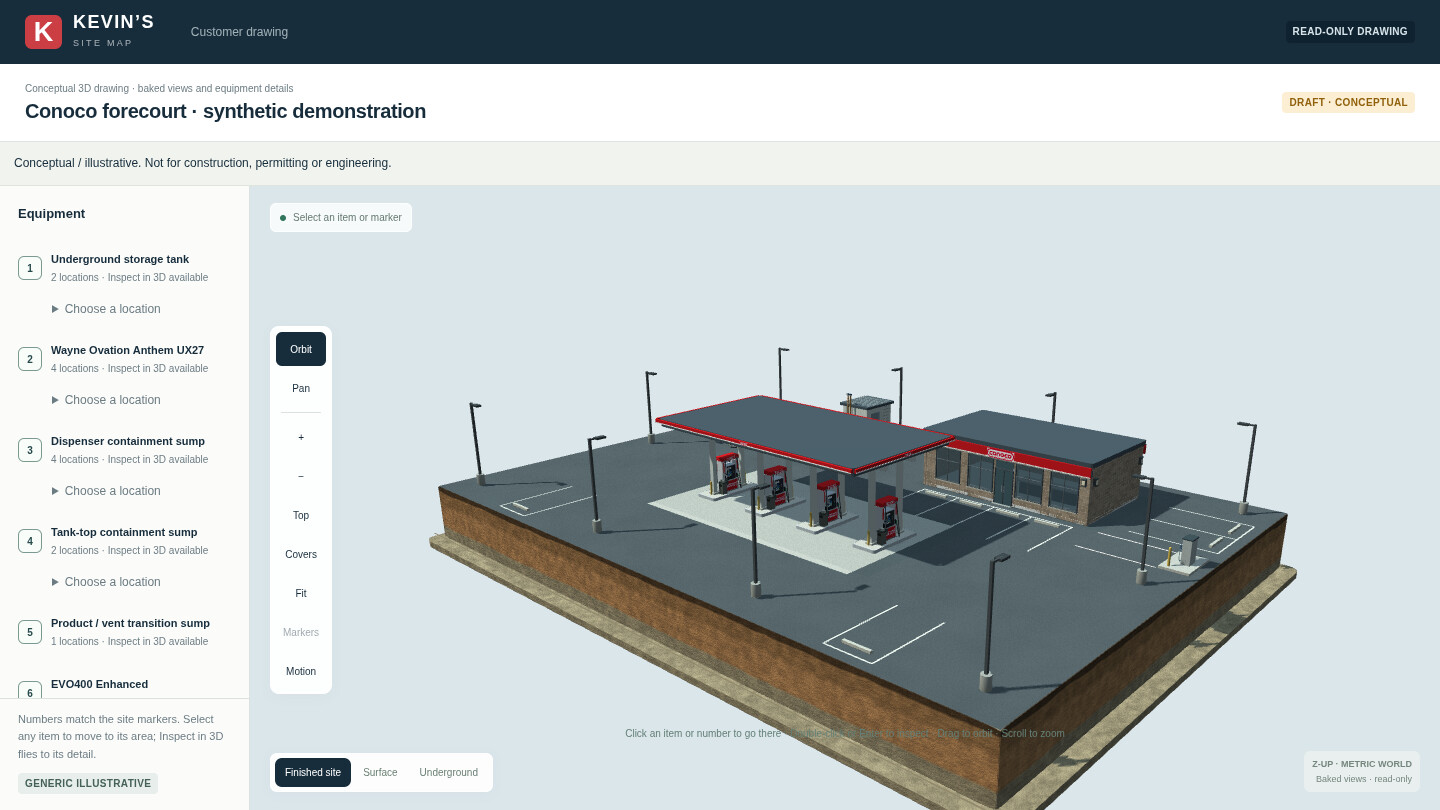
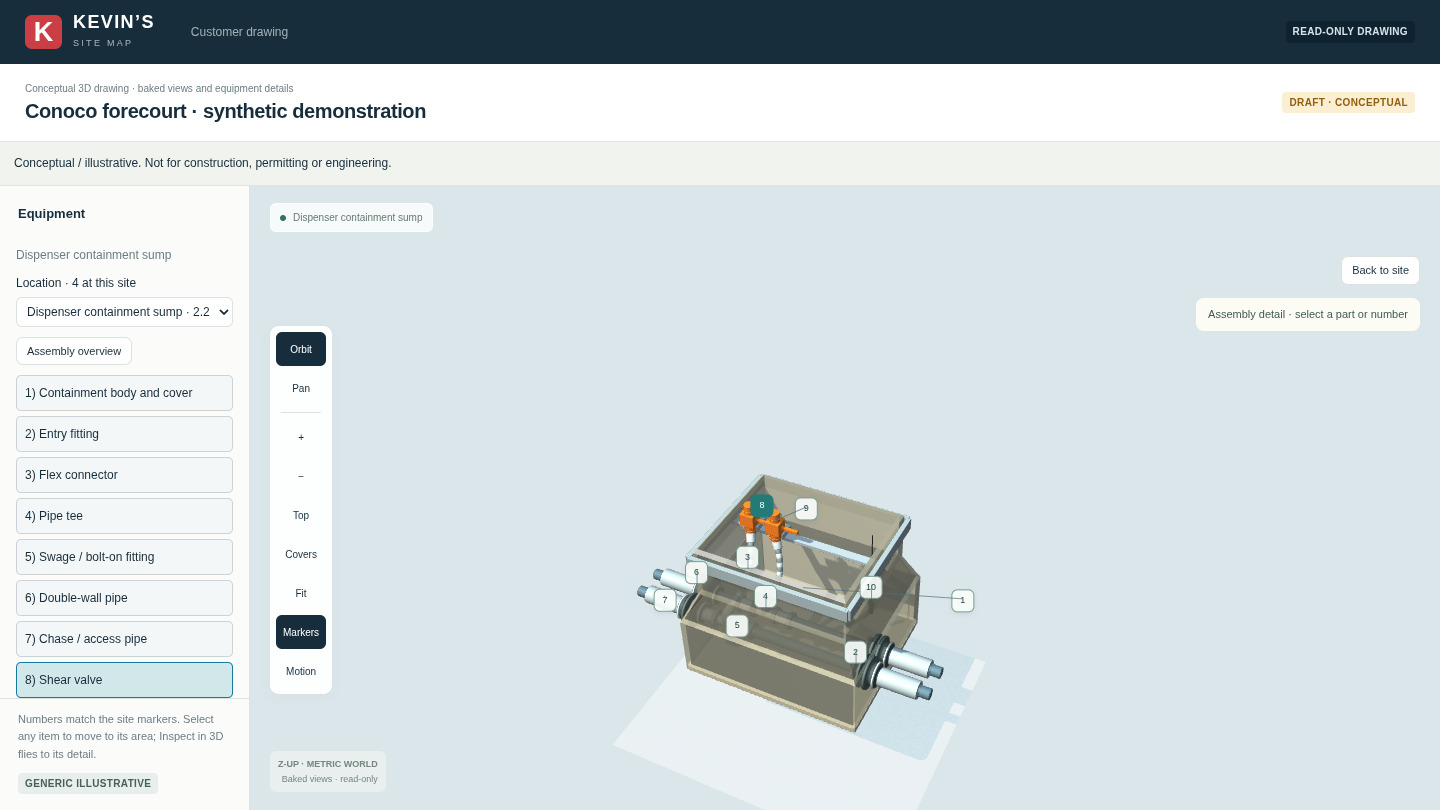
Select equipment once to locate it on the site. Choose Inspect in 3D for a closer view. At the dispenser sump, pick the shear valve to see where it sits in the connected pipework. At the tank-top sump, choose Explode to see how the assembly fits together.
Original film · 55 seconds
One question before the concrete goes in. Watch what comes back to the foreman.
Play the 55-second filmInside the job portal
Open the site, pick the dispenser, and ask right there. Someone reading the drawing from the opposite side of the counter can see exactly what you mean.
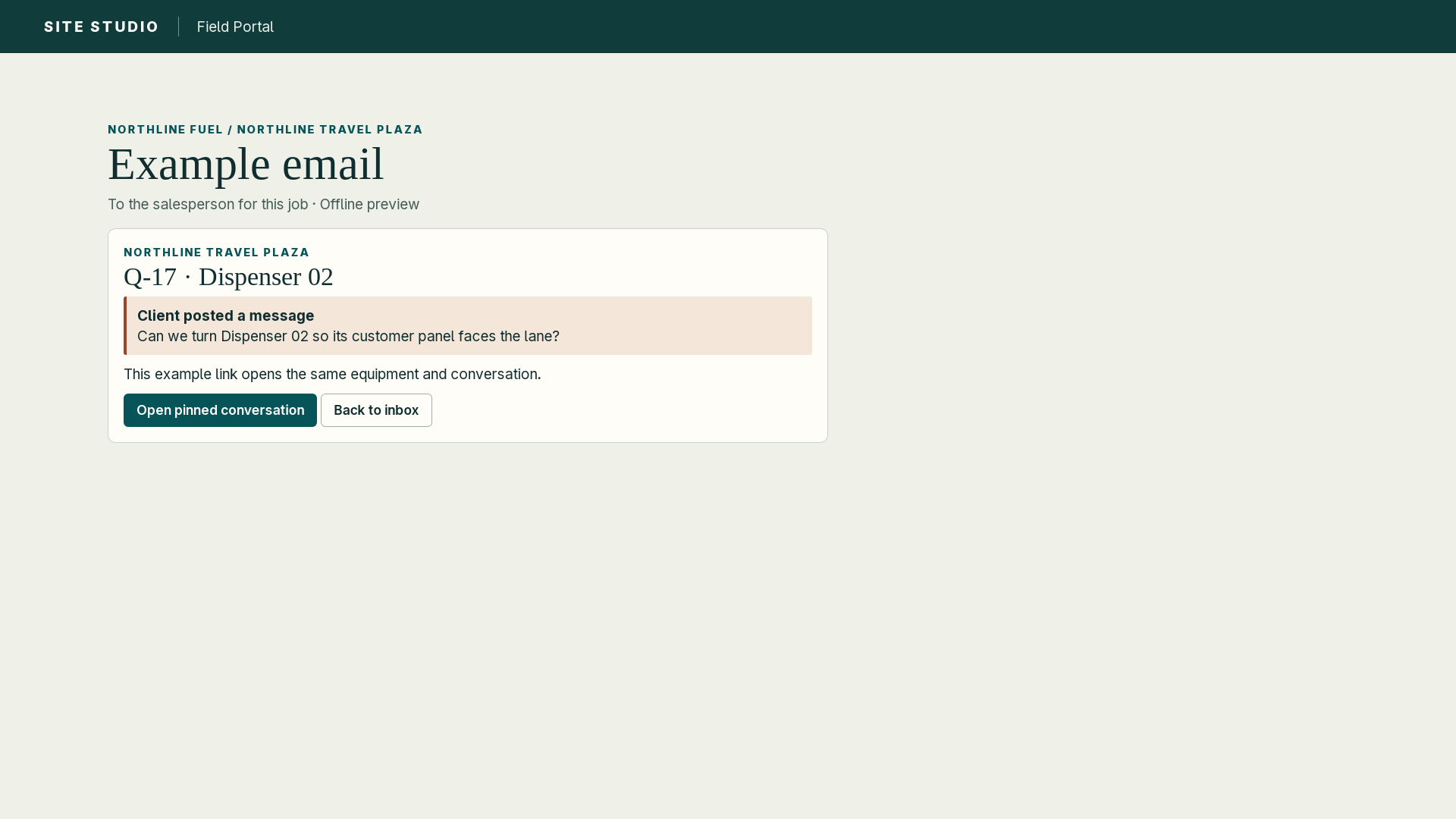
The owner signs in, clicks dispenser two and asks Sales to turn the customer panel toward the lane. The salesperson receives an email. Its link opens the question on that dispenser, where Sales can answer or ask the Agent to draft the change. Open the salesperson’s sample email
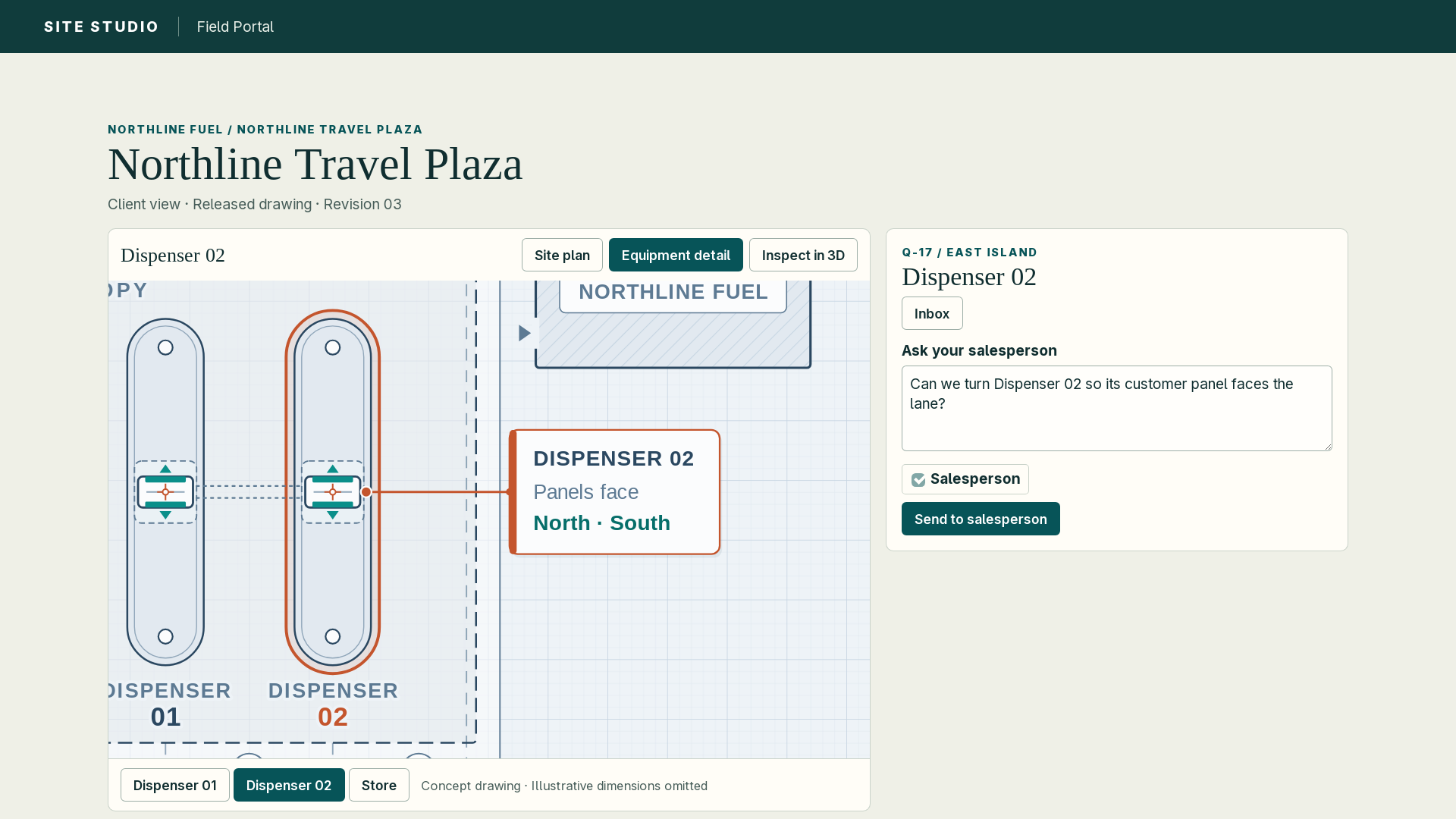
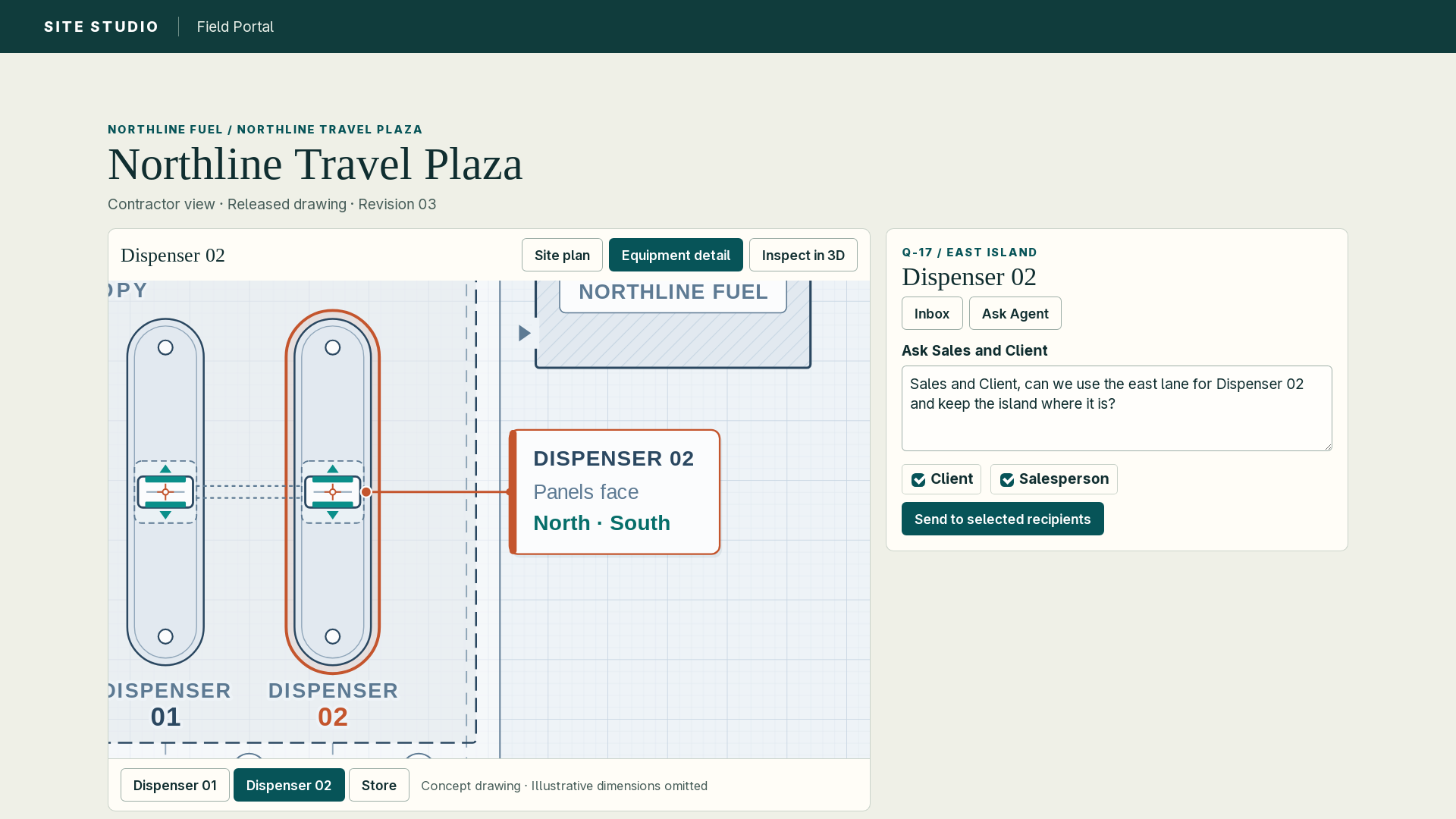
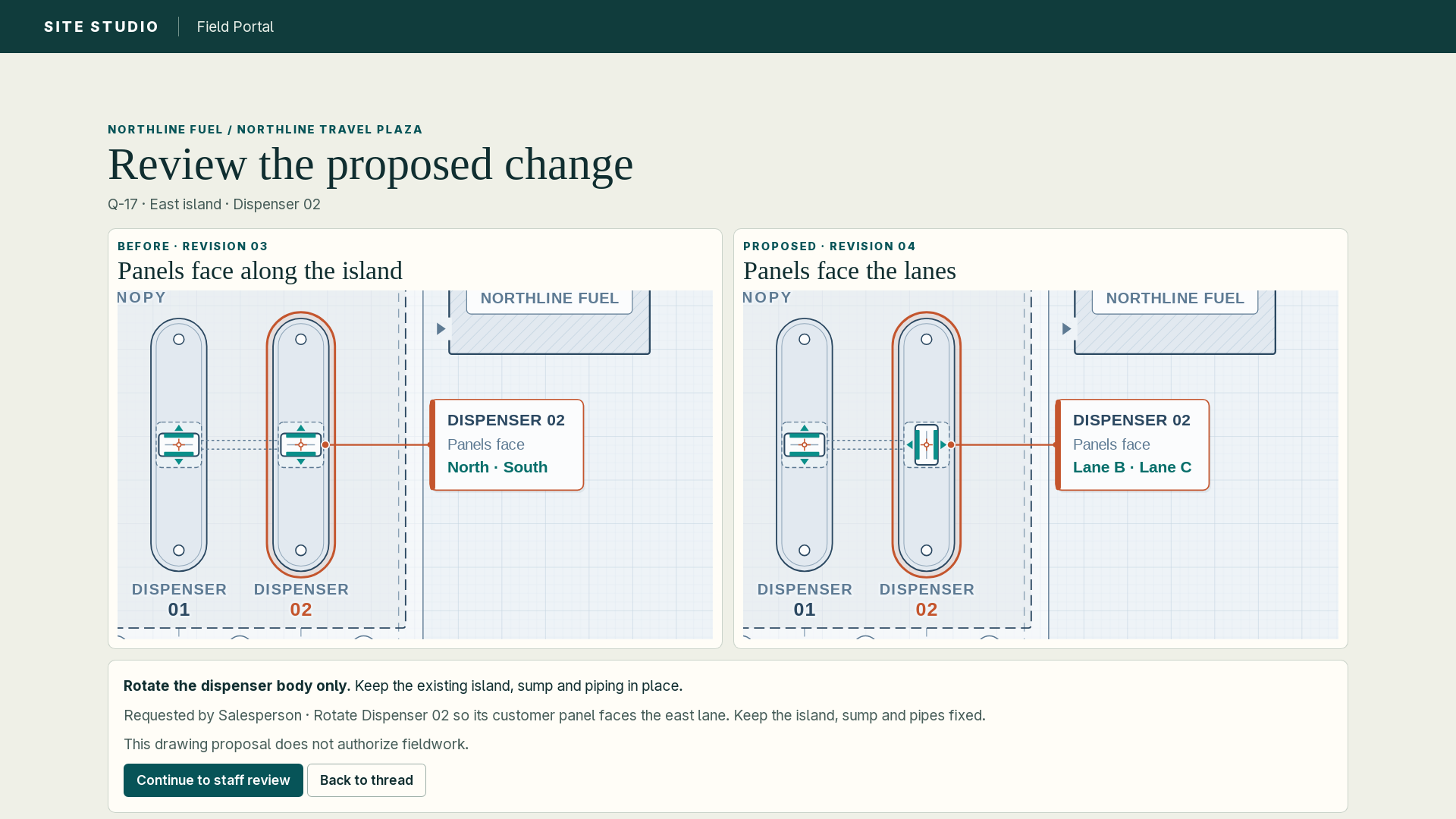
The foreman can ask Sales and the client on the same part. Each person who needs to answer gets an email. Once the owner confirms the lane, the contractor can click the pin and ask the Agent to turn the dispenser body. The drawing lead reviews the proposal before the crew gets an issued copy. Try the contractor’s change request
Job portal examples
Use the same equipment location to keep the client’s question, the field decision and the issued drawing connected.
Review who has project access and decide who can issue or share a drawing.
Compare bid inputs with the proposed layout and answer the client’s question at the dispenser pin.
Check the issued drawing before setting out the island and request a field change from the affected equipment.
Open the shared site, inspect the equipment and leave a question pinned to the dispenser they mean.
Check approved quantities and supplier assignments before requesting quotes. Flag substitutions that still need a decision.
In the owner-authorized workspace, review costs and approved changes against the drawing release tied to a billing milestone.
Customer tour example
Start with the Conoco forecourt, move in to the Anthem dispenser, then open the dispenser sump. The three stops connect the site layout, the equipment at the island and the assembly below.
This is the video the customer can replay at home or take into a meeting.
At the estimating desk
Compare the field inspection, project changes and parts list with the drawing. Keep unclear dimensions open for confirmation.
Drawing and estimating
Some jobs arrive as a full bid set. Others start with a parts list on the counter. Here’s how each can become a drawing or an equipment takeoff.
Match equipment and quantities, ask for missing site measurements and flag supporting items that still need confirmation.
Keep the sketch available for comparison and call out unclear marks or missing dimensions before finalizing the proposal.
Use the scales, schedules, details and addenda, and flag conflicts for review.
Count installed assemblies and their components, including sizes, accessories and product assignments.
Compare RFQs, plans, notes, specifications and renderings, and resolve conflicting requirements and exclusions before calling the list complete.
Start from site needs, choose equipment and compatible options, then place and connect them in the drawing.
Owner review
Open a work area to see what’s finished and what comes next. The drawing screens are up for review. Before a buyer tries the materials list on a job, the team still needs to match the quantities to the bid documents and account for missing items.
358 tasks in the plan
Review the existing screen designs for finding, editing, inspecting and handing off a drawing, then confirm the direction before redesign work proceeds.
Search for a project and open the desired drawing alternative with a pointer or keyboard. If search returns nothing or a project has no drawing, show the actions the user can take.
Show what to do while moving around the drawing, placing equipment or drawing a route, and return focus to the expected tool after finishing or canceling with a pointer or keyboard.
Select equipment to locate it in the full drawing, choose a location when it repeats, and inspect that model and location before returning to the same selection with positions and routes intact.
Move or turn selected equipment, undo or redo, and save with a pointer or keyboard. Explain unavailable actions and keep unsaved edits through waits, retries and conflicts.
Label unsaved work, saved revisions, submitted proposals and approved deliveries, and show each role the actions it can take while keeping private material protected and approval with the authorized person.
Test opening, selecting, inspecting, editing, undoing, saving and handing off a drawing with a pointer and keyboard. Check visible and restored focus, status announcements and narrow screens before the project owner reviews the full workflow.
Finish listing authorized details for current and older drawings, and check the results after a save, a restore or a rejected unreadable record.
Set the rule for tied and archived options, show fields the viewer may see and distinguish a confirmed zero from an unavailable count.
Match each image to the drawing and access level it was made for, and report when a preview is missing, damaged or outdated.
Show a permitted saved image or placeholder on each card and verify that the drawing list never loads 3D software or scene files for any role.
Fetch previews as needed and prevent old requests from restoring cards or images after sign-out, account switches or access changes.
Check summary responses, saved previews, owner access, summary creation and restore, and record the exact examples used for approval.
Verify pages, access, seats, previews, restored drawings and summaries added for older drawings against the tested software and data versions.
Show 24 cards by default and at most 100, limit card and page sizes, and restart paging after 15 minutes or an access change.
Record the Omarchy hardware, system, browser, installed software and drawings so first and repeat launches can be tested on the same setup.
Time opening the list and map, editing and rotating the view, and check memory and graphics use against the targets under both conditions.
Measure processor capacity, memory, process and temporary disk peaks across the full job and its child processes to set practical limits.
Preserve raw results, failures and variation, and identify which scene details and workloads the tests covered.
Record 20 first and 20 repeat opens, at least 100 interactions, one minute of rotation each while idle and busy, and 30 two-tab transitions after warm-up.
Verify that 95% of measurements meet the opening, input, rotation and lightweight request targets and that memory settles after repeated use.
Identify the visuals current drawings need, preserving people, editing and historical views while skipping unused vehicle files in current scenes.
Keep the editor out of dashboard startup and load the geometry required by the saved drawing revision.
Keep cutaways within a defined workload through the largest supported excavation, preserve required geometry and report drawings over the limit.
Accept valid indented outlines drawn in either direction and reject crossing lines before changing the drawing.
Cancel old loads and free graphics resources when leaving a drawing, and recover from a hidden tab or graphics failure without carrying over assets.
Check current drawings, older versions and unsaved drafts for intact positions, routes and draft edits, and verify each older version uses the right 3D software.
Verify drawings with up to 300 items, 800 routes, 10,000 route points and 500 materials rows fit the 256 MiB per-tab decoded graphics budget, and flag drawings above supported limits.
Capture the same saved revision, source evidence and equipment, asset and rule versions on desktop and web, and refuse requests when inputs or access have changed.
Finish creating fixed proposals for drawing, materials and asset changes, and restrict contractors to their assigned work.
Compare with the exact saved drawing, show affected items and require a decision for each extra edit or removal, with a fresh proposal if only part is wanted.
Save the entire proposal and approval together once, handling outdated proposals, lost replies and the choice to save, discard or stay without creating extra revisions.
Closing the review, pressing Escape or switching views preserves unsaved layout and proposal edits, and delayed actions cannot override that choice.
Cancel old preview requests and remove their on-screen elements so delayed results cannot appear in the next review.
Guard the proposal draft even when the drawing is saved, keep it when the user stays and clear only the selected draft when discarded.
Give the area or line its chosen label, dimensions, action and supply settings in one undo step, and clear those choices when placement ends or edit access changes.
Check every replacement before applying the batch and preserve the drawing and undo history if a selection is invalid or the editor is out of date.
After an accepted edit, keep the detail panel on the current version of that object and prevent another panel or delayed response from changing it.
Check the catalog and save result before adding an edit to history, and keep the action and draft available if confirmation is lost.
Test successful saves, navigation, conflicting revisions and delayed replies or permission changes, and verify the saved drawing, history and draft reflect the valid current action.
Let owners create or import a 3D item for review and reject invalid shapes or pipe connections before it enters the catalog.
Keep the exact asset on current and older drawings, and show how replacement or removal affects the drawing and counts without carrying over unsupported quantities.
Use proposal review to change the asset at a location, save the approved choice and decision once and refuse outdated or unauthorized changes.
Keep the editor, inspection, preview, publication, tour and media on the validated assets for each revision, including the originals used in older publications.
Remove expired staging files once nothing uses them, keep assets used by drawing history or publications and reject unsupported files clearly.
Use the exact catalog and connection rules across edits, jobs and publications, and stop when the required version is missing.
Show which connection setting takes precedence, update the route before saving and block incompatible connections while preserving circuit order and quantities.
Check file size, geometry, nesting, materials and numeric precision, and reject the whole import if invalid or above limits so parts are preserved.
Check the stated envelope against the model, confirm connection points are within tolerance and distinguish nominal pipe size from measured diameter.
Finish locating with one click, opening inspection on purpose, selecting several items and choosing among repeated locations while keeping keyboard focus on the right item.
Make one gesture one undo step, create one new revision per save or restore and recover the exact unsaved work when a save is uncertain.
Place, move, copy, replace or remove equipment by location, give copies their own identity and internal connections, and show which routes replacement or removal affects.
Numeric placement, snapping and alignment work, with group previews and dispenser rotation that keeps islands and pipe connections fixed still to finish.
Preserve shape, layer, thickness and placement details, reject invalid outlines without an undo step and keep narrow lines selectable.
Across 123 equipment families, use one numbered entry and a location chooser per model to select and edit a single instance.
Edit connections, waypoints, products, sizes, route roles and tank compartments, preview the reroute and save only compatible endpoints in circuit order.
Finish the controls for calibration, evidence, quantities, supply, exclusions, substitutions and completeness, and verify that inspection preserves connections and counts and customer delivery excludes private records.
Save shared appearance, location-specific views, assemblies and layers on the drawing, keep camera and accessibility choices personal and preserve placements and connections during inspection.
Choose an empty lot, a two-island store with underground tanks, an aboveground cardlock or a workshop, and convert a chosen decoration into editable equipment with undo that preserves nearby parking.
Test keyboard focus and WCAG 2.2 AA at 1280 by 800 and 1024 by 768, and record assistant panel and physical-device results separately.
An authorized owner can resume within the original deadline and receive one saved original and receipt. Reject files with false formats, unsupported archives, old or macro-enabled workbooks, external links or embedded objects.
Check size and complexity throughout upload and reading, and leave formula cells unresolved even when a result is saved in the file.
List the files locally using recorded facts only, then track any extraction as one job.
Reopen the review decision for each page and selected area, and leave unseen, unreadable or incomplete pages out of bulk approval.
Preserve prior readings and owner corrections, and get explicit approval before proceeding from a new reading.
Save up to four parts in order at 8 MiB each, 32 MiB total and 256 KiB of supporting data. Reject the entire save if any part is missing, out of order or duplicated, or if a fact appears twice under the same ID.
Link current requirements to their supporting evidence, check the saved version before applying changes, and keep earlier requirements readable after a retry.
Save the approved equipment, plan area and systems, and require review before applying any outside change. Retired or erased selections expire, and a new project starts with an empty saved option.
Return the original fixed receipt for an authorized area selection or extraction review so the save happens once.
Review results for materials lists, sketches, plan sets, both kinds of takeoff and guided site building. Guided building also needs recovery and customer delivery checks.
Allow originals up to 256 MiB and batches of up to 20 files or 500 MiB. Older upload paths allow 25 MiB, and generation has its own 256 MiB input limit.
Allow 500 pages per PDF and 2,000 selected pages per request, with up to 256 MiB of expanded data per file, 64 MiB per stream and 60 seconds each of processing and elapsed time per page.
Read one image or page at a time, up to 50 million pixels, 16,384 pixels on either side and 16 million pixels per page for text recognition.
Allow up to 16 MiB, 100,000 rows, 256 columns and one million filled cells per file, with up to 32 KiB per cell and 1 MiB per row.
Allow up to 100 sheets, one million cells and 1,000 packed entries, with 256 MiB expanded per workbook and 64 MiB per entry. Limit expansion to 100 times the packed size, internal nesting and attributes to 64 each, and cell text to 32 KiB.
Allow 64 KiB per page or area, 32 MiB of prepared output and 15 minutes per attempt, and show what remains unfinished when a limit is reached.
Set separate limits on originals, versions, selections, reviewed extractions, references, supporting data, generation inputs and review batches. Extraction has a 500 MiB original-file limit. Limit owner requirement text, subjects and rules while keeping older requirements readable.
Allow named areas with up to 500 equipment items and 500 supporting references and a simple ground-plan boundary with 3 to 256 corners. Limit the size of each saved area and show 50 summaries per page by default, with a maximum of 200.
Confirm each item, unit, quantity and package contents against owner evidence, and count included parts only once.
Record verified positions and distances, label conceptual placements, and show which locations still need a decision.
Use the standard review and save steps to create equipment and assemblies that reopen for editing under the same equipment identities.
Confirm a reviewed drawing saves and exports, and check how missing details, cancellation, reconnection and intervening drawing edits are handled before recording acceptance.
Reopen the sketch with a separate layer showing how marks and dimensions were read and where uncertainty remains.
Use a confirmed dimension to scale the drawing, or label the scale as conceptual where a measurement is unavailable.
Save editable equipment and routing plus a proposed materials bill tied to the sketch, and keep missing parts and unresolved facts visible when reopened.
Review, save and export a representative sketch, and check conflicting marks, cancellation, reconnection and changes made after generation.
Review drawings, RFQs, schedules, legends, details and addenda together, then record which governs and retain the revision history of each decision.
Flag contradictory details and missing dimensions for an explicit owner decision. Plan text carries no authority to make changes or approve construction.
Link proposed geometry to the plans and allow the owner to review changes within the approved scope before applying them.
Confirm a reviewed plan-set drawing saves and exports with qualified acceptance, including checks for conflicts, cancellation, reconnection and intervening edits.
Record the drawing revision, equipment versions, catalog and assembly rules so the owner can reproduce the materials bill.
Count placed equipment and assemblies, leaving out illustrations and alternates and counting package contents only once.
Let the owner see which quantities come from the drawing, a quote or supplied information, which are inferred or proposed, and which remain unresolved.
Have a qualified reviewer confirm the quantities for export, and keep missing parts or assembly rules visible if review is interrupted or the drawing changes.
Compare units, revisions, alternates and exclusions before drafting a materials proposal, and record which items apply to each scope.
Show confirmed zero quantities and quantities that still need a count, and require a review decision when documents conflict.
Link the proposed changes to their supporting evidence and require owner approval before saving. Uploaded document text carries no authority to make changes.
Confirm representative proposals can be reviewed, saved and exported with acceptance, and still require review after unclear inputs, embedded instructions, cancellation, reconnection or changed inputs.
Start from a template with manufacturer-neutral equipment options, record owner requirements, and show assumptions where information is missing.
Use the regular controls and connection rules to place, edit and connect equipment, and leave unverified purchase claims out of the concept.
Let the owner review a customer-safe view with a visible concept label, while keeping procurement approval a separate decision.
Test incomplete requirements, cancellation, reconnection and later changes to the base drawing. Full acceptance also requires recovering the original save and reviewing publication of the quote-free concept.
Record which evidence, equipment families, systems and connections each version covers so repeat checks agree and unavailable results are visible.
Report results for sources, identities, units, assemblies, routes, allocation and visuals, with supporting evidence and incomplete status where a source or check is missing.
Mark each component supplied, proposed, unresolved or excluded with a reason, and keep the bill incomplete if any required item is unresolved.
Verify which alternatives fit, count each accepted package once and distinguish drawn, quoted and inferred quantities.
Show owners the responsibilities, supporting evidence and decisions behind the bill, with concept drawings marked incomplete while gaps remain.
Record which sources and rules the owner approves and the decision on every remaining gap before the trial.
Update the intended geometry, preserve saved pipe connection points and published versions, and retire the process that rebuilt the whole library.
Use the same geometric rule for the elbow and its pipe connections, then check affected saved routes and identify any required corrections.
Get written owner or supplier confirmation of model suffixes, contents, connections, dimensions and counts for OPW DSE/Bravo, Loop/EDGE3100, APT, CableTight and electrical controls, and list what remains open.
Get owner or supplier confirmation for each site's tanks, equipment placement, products, sumps, pumps, monitors, truck access and DEF details.
Compare canopies and islands with known station layouts and furniture with building proportions, and retain support for the C18 depiction and accepted proposal reference.
Update the affected canopy wording and Anthem geometry records and retain the basis for each correction.
Reproduce dock clipping, curved-collar lettering, and the Soap Lake export, bollard and trench issues. Verify corrections where possible and identify the inputs still needed.
Ask the project owner to approve the views, proportions, materials, visual priorities and inspection controls, and record that decision separately from procurement and construction approval.
Keep the stops, views and drawing facts in a separate tour history so the tour can be edited without changing the saved drawing.
Link owner edits to the generated sentences and their supporting facts. Ask for a correction or fresh confirmation when a fact changes or a stop loses its reference, screen scripts for private details before saving or speaking, and apply pronunciation only to speech while preserving written captions.
Keep all inspection stops available in both versions, with consistent timing and text ready for captions.
Return the original approval or rejection after a reconnect and show the edit history for the affected tour or drawing.
Test what the tour editor does when drawing facts change or private text is submitted, and check both motion versions. Verify narration with separately generated audio.
Build and check the actual deliverable against its allowed content. A drawing carries no tour or narration, and a tour uses the exact stops, rendering tool and graphics reviewed for it.
Allow up to 40 stops, ten minutes and 256 KiB, with every stop and spoken word intact. Apply separate limits to the rendered scene and check it within 30 minutes.
Send only customer-safe script segments to an approved service, model and licensed voice, and keep account keys out of assistant files and tools.
Verify script segments, pronunciation and audio format, and confirm current access each time saved audio is reused or delivered.
Check character and dollar limits across simultaneous requests, submit identical segments once, and keep an independently confirmed record of the resulting charge.
Recover the provider's original result through billing and require explicit approval for a paid retry. Keep any switch to another paid service from happening automatically.
Confirm independent billing records, protected validation, current voice rights and price, spending caps and the project owner’s explicit approval. Use capped live requests to verify the service and test withdrawing account access.
Verify that real speech and matching captions recover correctly after an interruption. Narration acceptance remains open until real audio passes.
Reuse identical segments across jobs and retries and release jobs with unknown charges. Allow one replacement request only with explicit approval and its own reserved budget.
Allow 10,000 characters per run and 20,000 per day for both the owner and account, with current pricing and an approved dollar cap. Verify 24 kHz mono PCM WAV audio and captions within 250 ms, with whole words intact.
Record the exact browser, graphics engine, Blender version, encoder and fonts, and verify their usage rights and measured performance before production approval.
Produce playable 720p and 1080p MP4s at 30 frames per second in both motion modes, with every frame, matching audio and captions, and poster images.
Use measured times for getting assets, downloading, file preparation, speech and upload checks, and start only when all required measurements are available.
Use current readings to size transfers and decide how many run at once. Count measurements once and keep the original deadline.
Keep temporary files, their dependencies and reserved capacity protected until verified cleanup confirms the old process can no longer change them.
Once the project owner identifies the setup and its isolation and resource limits are verified, test both resolutions and motion modes at 30 frames per second on a 5 Mbps upload while editing. Keep all frames and finish transfer and validation within 120 minutes.
Run every required version with approved tools and services, and retain the original outputs, integrity records and measurements for review.
Use the registered sample to measure owner-only costs under the approved voice, permissions, resource limits and deadline. Recheck the tools, cost profile, upload speed and available capacity before production, and require a new submission if the profile changes.
Check current access and whether the files match the exact source, script and voice. Count reused files and the work to assemble them against the original budget and deadline.
Use a recent idle network test and confirmed transfer progress to adjust uploads within the original deadline. If a 1 MiB block cannot transfer, end the attempt and require a fresh test before an explicit retry.
Verify all frames for 720p and 1080p at 30 frames per second with narration and both motion modes while editing on the project owner’s declared setup with a 5 Mbps upload. Finish within 120 minutes, record failures and rerun after a documented fix.
Cap captions at 4 MiB, posters at 16 MiB and 4,096 pixels per side, WAV files at 256 MiB, and MP4s at 1 GiB, ten minutes and 1080p at 30 frames per second. Process motion versions one at a time and limit memory use within 128 files and 4 GiB total.
Run the registered 60-second sample at 30 frames per second in both motion modes, keeping all measured narration up to ten minutes. Limit measurement records and saved production settings, and count media fetched during the run against the shared capacity and deadline.
Freeze the customer view and its checked deliverable, record what was reviewed, and save a fixed publication version only after separate approval.
Tie each invitation to its intended recipient and let the owner remove a single member or everyone. Recovery keeps invitation secrets hidden.
Let current members retrieve their own receipt while keeping internal records private. Replace an invitation if the original issue cannot be confirmed.
Apply membership and withdrawal checks to old and current views, downloads, file information, partial transfers and cached copies, and stop open transfers within the required time.
Keep quotes, procurement details, internal names, evidence and proposals out of the files customers receive.
Test actual pages against WCAG 2.2 AA with captions and a 360 CSS pixel layout, and confirm access works for approved customers and stops after withdrawal.
Prepare the reviewed publication and invitations, then wait for the project owner’s separate explicit approval before sending or publishing.
Screen feedback, replies, summaries, alerts and filenames before saving or sending, and avoid repeating rejected text. Link feedback only to public items and keep older unchecked text owner-only.
Offer both motion modes at every resolution and use single-use invitations tied to recipients for seven days by default and 30 at most. Meet WCAG 2.2 AA at 360 CSS pixels and stop revoked transfers within one 1 MiB block or one second for data still under server control.
Verify that staff receive only permitted model information, including in images and saved browser responses after a role change.
Finish linking the remaining originals so owners with access can retrieve them alongside the existing drawing versions and equipment references.
Apply customer and staff permissions consistently to drawing titles and fields, preview images, publication records and lists.
Open only the selected publication, require fresh identity confirmation before returning to privileged access and verify that withdrawn links fail.
Check permissions on new requests, retries and resumed conversations, refuse unclassified projects or disallowed tools and return only permitted results and usage.
Keep a recoverable record of membership, permissions and assignments, and withhold staff access when the person's history cannot be verified.
Preserve signed activation and ownership changes through recovery, and compare repeated seat changes and an ownership transfer with an independent record of the current state.
Test interrupted saves so restoring an older backup cannot revive cancelled jobs, revoked devices or removed access.
Authorized owners can pick up the original conversation and its activity in order on the web or local companion after a restart or restore.
Someone can watch or take control under a 60-second window renewed every 20 seconds, and work already authorized separately can finish after the previous controller loses access.
Reconnect to the original action and approval so a consequential action runs only once, and resume only while the original access and scope still apply.
Let other jobs run while a conversation waits, check access again at the start of each turn, and block outdated turns from claiming capacity or completing.
Encrypt job or conversation records with clear retention and deletion rules, or turn off provider history and resumption. Remove records that depend on deleted sources and keep provider data out of customer and presenter views.
Sign in again to grant one device limited, single-use access and approve each start on the device. Replace lost grants and handle privileged changes in the browser.
Keep messages and results tied to the exact source selection, suspend old grants when access expands, delete dependent content when a source is erased, and reject requests that mix incompatible access.
Keep the original approval and deadline, record the result before confirming it, and use that record to resolve uncertainty. Handing over control cancels unused approvals.
Owners can read complete pages of text and final results, with matching records on retry. Operator access excludes standalone transcripts and posting worker updates.
Apply the relevant permissions to drawing, materials, asset and tour edits and to generation and media jobs. Keep outdated proposals read-only and run predictable jobs without conversation data.
Limit a grant to eight hours and 60 authorizations, with ten minutes to claim it and five minutes to approve an action. Renew the 60-second control window every 20 seconds, count identical retries once, refund only expired approvals, and end access at the earlier of the job or operator deadlines.
Allow 4 MiB per job or turn across retries and 16 MiB per conversation, limit updates and text, and preserve complete characters, approvals and final decisions when a limit is reached.
Keep completed conversation and job records and unused proposals for 90 days, failed workspaces for up to seven days, abandoned staging for 24 hours and audit history for 400 days. Open turns follow job expiry, and applied history, held references and originals are preserved.
Use the supported local Codex connection and verify live updates, explicit approval and cancellation without opening a public port.
Check the application, connection and actual model before starting, and report Codex as unavailable if it cannot meet the job requirements.
Apply current permissions to starts, retries, follow-ups and approvals, and keep protected information and secrets out of logs.
Accept updates only from the active attempt, show usage reported by the provider and mark missing usage or costs as unknown.
Simulate failures first, then verify the approved version and model, live updates, approvals, interruption recovery and managed temporary storage on the desktop.
Check that supported sessions can handle approvals and resolve an interrupted approval or failed connection without leaving processes running.
Verify Claude Opus 5.5 with high reasoning and standard processing with Fast mode off, and reject the run if those settings cannot be confirmed.
Save progress when Claude runs out of quota, and resume with GPT-6 Astra only after the project owner approves that attempt in writing and access is confirmed, using the same limits and no paid overages.
Publish each Blender update as a new version, record what it used, and keep the same equipment, positions and pipe routes.
Simulate privacy failures and exhausted allowances first, then use separately approved runs to verify the actual settings, separation and disabled paid overages.
Finish saving jobs, conversations, actions, inputs and results so each retains its exact references and access rules after an upgrade.
Add the final definition and verify that all 17 entries point to exact versions the related features can use.
Check requests against the current catalog, drawing history and browser session, and reject requests using outdated information.
Account for all 35 models and define how to spot even short private strings in extracted files, images and recovery results.
Check every available summary field and event, block missing or outdated inputs and accept the exact result independently reviewed.
Record approved inputs, limits, error handling, manual steps and rollback for the features that depend on each other.
Check that older records upgrade once, repeat runs stay stable, unknown records are handled safely and rollback restores the expected disabled settings.
The check definitions cover extraction, job access, media, previews, summaries and owner rules, with combined runs still to do.
Apply the agreed rule to outstanding invitations when access is removed in bulk, verify the result and record the final definition.
Confirm identity before pairing and check after restart that replaced, revoked and differently assigned devices are refused.
Use the same fixed inputs from both places, identify the signed-in requester and reject sources outside that person's access.
Verify that only the current attempt can update or complete a job after competing claims, cancellation, timeout or restart.
Return the original result when inputs match, require a new request for changed inputs and resolve an unknown outcome or explicitly resume it before starting more AI work.
Limit queued jobs and event history so slow outside calls leave saving and maintenance available, and show whether work is waiting, offline, awaiting approval or failed.
Check that people can still open hosted drawings and save manually after disconnect or revocation, and record the event for owner review.
Reuse the existing reservation and accepted result after retry or restart, and allow a replacement only after the old attempt stops while preserving media completion during a controller-only takeover.
Set processor, memory, process and queue limits and verify that the app keeps its memory and disk reserve while extra jobs wait.
Try a normal stop, force it after 10 seconds if needed and alert after two minutes if still uncertain, holding the job slot until shutdown is confirmed and disk space until cleanup.
Allow room for both copies and temporary checking files while keeping 20 GiB free, and retain uncertain reservations after restart until files are accounted for.
Track check-in and work deadlines separately so restarting or renewing a claim still respects the original attempt and upload deadlines.
Give each job a separate workspace and verify it cannot reach unrelated drawings, saved credentials or machine-wide extensions.
Run the job and all its child processes at low priority under shared processor, memory and process limits, with one slot for CPU rendering.
End the whole job on cancellation, expired access, revocation or deadline, reject late results, show the current status and leave unrelated apps running.
Stage media and geometry privately, reject executable, unexpected or oversized files before transfer and require server approval before use.
Use confirmed server status to resume after a lost reply or offline restart, and remove staging files that no active or recoverable upload needs.
Before enabling the companion, confirm all job processes stay within limits, cannot read credentials and exit on cancellation, revocation or deadline.
Use two logical processors on separate cores, slow jobs at 4 GiB of memory, enforce 6 GiB of memory and 1 GiB of swap, and confirm child processes inherit those limits and reduced priority.
Check available memory and disk before graphics, media or extraction jobs start, reserve room for the editor, limit temporary files and logs, and flag long waits.
Set time limits by job type for waiting, transfer and checking, and verify size limits for prompts, queued work, drafts and returned files.
Build previews using the 3D software and assets required by the saved revision, and reject unsaved drafts or drawings missing required files.
Create a new image when the option, saved revision, assets, 3D software or audience changes, and keep owner-only images in owner views.
Remember whether previews are enabled and keep only the newest eligible job so superseded requests or exhausted retries cannot produce images.
Show missing, outdated or failed previews and verify access and drawing requirements even for image details, partial files or cached copies.
Keep images within 512 by 320 pixels and 2 MiB, allow two fresh retries for the newest eligible request and show a placeholder or status when needed.
Keep an independently confirmed history of memberships, invitations, rules, publishing and credentials that can rebuild the current access record.
Preserve links among conversations, requirements, graphics, media, proposals, jobs, previews and speech when backing up, clearing or restoring them. Preserve canceled or invalidated outcomes, pair devices again, and verify full recovery separately.
If recovery stops partway through the access history, keep outside access closed until an independent check confirms the final state.
Record key changes, when revocations take effect and how to recognize repeated records across key changes. Keep affected access closed if a key needed to verify the history is missing.
Recover the original charge record for an uncertain narration request and prevent another chargeable request if that record cannot be recovered safely.
Check every owner sign-in and feature access path, then verify full recovery in a live rehearsal with the real host and independent custodian.
For each workflow, confirm an ordinary action succeeds and that restricted access or outdated information blocks it when required.
Finish comparing older drawings with independent records and confirm the expected shapes and connection points where applicable.
Verify that a file cannot be swapped after its permission check, or record the decision to exclude protected file access from Windows support.
Verify that the launcher connects through the supported local connection and that local network requests and untrusted forwarding details are rejected.
Account for both installations and retained copies, including which services save live drawings and which software, database and equipment versions they use.
Confirm that the disks can hold the 16 GiB plus 64 MiB archive and the backup, staging and rollback copies at the same time.
Finish backing up the database and its linked assets, time a protected restore and verify that current access and keys can be recovered separately.
Find out whether the upload and any related report action went through, and hold the retry when the outcome is still unknown.
Recover the six missing originals and verify that each matches the assigned review and that the reviewer has access.
Match the saved correction to the operation that produced it and wait for an authorized decision on that exact copy.
Once approved, apply the correction to the 452 reviewed uses and preserve the separate rules for yes or no, missing values and values that must be finite.
Run the designated checks once workflows, test materials and services are ready. Start with synthetic inputs, use representative sources only with approval, and record failures, omissions and observations from integration alone.
Confirm owners can keep editing, jobs stay separate and share capacity fairly, and interrupted connections or approvals recover correctly.
Keep the original timing and resource records and show which measurements are missing or which targets were missed.
Exercise all six workflows with manual editing, sessions, graphics, both assistants, Blender and real narration and delivery. Full acceptance still requires recovery and the production switch.
Complete all eight authorized checks with real services, and keep release on hold if any credential isolation check is missing or fails.
Record each cause, independently reviewed correction and evidence that the defect stays fixed in actual use. Keep findings open where checks are missing.
Have fixes reviewed independently and rerun every affected full acceptance check, with component tests and simulations as supporting evidence.
Test every role across access paths, actual downloads, displayed views and supporting files, including permitted owner and worker use of private inputs. Final acceptance requires a real restore and final evidence review.
With separate approval, verify the actual host, software, connection, account and models, then check live responses, approvals, recovery and temporary storage.
With separate approval, verify sign-in, software, model, settings and approval handling, and confirm unrelated hooks, plugins and memory stay outside the session.
Run authorized checks that every assistant tool blocks access to operator, companion and cloud credentials while normal sign-in still works.
Confirm voice rights, data handling, current pricing and spending caps, and verify the account key can be replaced and revoked.
Make authorized calls to check 24 kHz audio in the request and the playable result, pronunciation, duration, and how the service handles errors and limits. Keep funds reserved for any charge whose outcome is unclear.
Confirm the approved model, reasoning level, connection and account access, then get confirmation for each attempt and stay within included usage.
Record the browser, graphics renderer, encoder, Blender version, document reader and fonts used, then verify usage rights and measure actual costs.
Check that the assigned device and customer media receive matching narration, and test outage recovery without using another paid service.
Package the exact release, data layout and upgrade steps with records that verify each, including persistent storage setup, separately managed credentials and a configurable site address.
Restore an encrypted project checkpoint and separate, fixed media copies using more than 16 GiB of test media, then verify that every referenced asset opens and protected copies survive cleanup.
Test copying and deletion at the same time so backup and maintenance jobs respect their own time limits and each other’s holds on protected data.
Agree on backup frequency, retention and restore targets, then independently restore an encrypted backup and check record counts, file matches, current revisions and revoked access.
Restore interrupted jobs, proposals, uploads, media, previews, device pairing and narration after changes to trust or encryption keys, then check who can open the restored files and images.
Rehearse repeated, failed and uncertain upgrades and verify that only one installation can save changes and that rollback preserves later spending records, access changes, messages and assets.
The project owner separately approves the host, custodian, schedule, settings and credential changes. Record successful, failed and late attempts.
Approve seven daily and four weekly encrypted copies, a maximum of 24 hours of lost data and a two-hour restore, then time the rehearsal. Back up every 12 hours or back up daily with retries after one and four hours. Warn two hours before the data-loss deadline.
Stop after 10 seconds waiting to lock the snapshot or 15 minutes waiting on pending records, and alert on stale processes or operator holds past four hours. Test that backups can proceed during narration and clear only their own holds.
Restore more than 16 GiB from a test checkpoint and separate media copies, verify file matches and protected references, test cleanup during copying and record deletions made after the snapshot.
Compare actual cost, capacity, isolation, storage and recovery before the project owner selects a host and approves spending.
Rehearse the move using the qualified release and data layout, then check the address, credentials, storage, access and that only one installation can save changes.
Check that changes saved during the move or rollback survive, and block older releases and publishing methods that can bypass those safeguards.
Prepare the release and rollback package for review and get the project owner’s separate approval for that deployment.
Match results to all 44 requirements, 27 work packages and 40 cases for the exact release. After provider, recovery and hosting checks, run all seven prescribed cases, repeat any checks affected by changes and verify each intended user seat, delivery route and recovery outcome.
Update the manuals, examples, service and data specifications, release details, and upgrade and delivery instructions. Keep past results tied to the releases they tested.
Verify that all critical, high and medium defects are closed and that required features, providers, capacity, domain and recovery checks are complete.
Check that the release contains the intended changes within the agreed size limits, and record which reviews are complete, pending or uncertain. Request the one included automated review only with explicit approval.
Record approval for each exact action before carrying it out and log what happened.
Give the recipient the accepted release’s guide, known limitations, recovery instructions and test results, and record delivery.
List what finished by Tuesday and what still prevents completion.
Record who will handle communications and resume only after the responsible parties agree on scope and on the security, recovery and trial conditions.
Agree on scope and acceptance conditions before scheduling more organizations, billing, model processing, offline use, providers or voices.
Retain the oil-brand references and resume the named design work when the project owner supplies the applicable reference and reopens it.
Link each dated, approved decision to the requirement it changes and keep the existing defaults until a decision changes them.
Independently reproduced five earlier code versions and checked their changes against the originals. Later work requires verification of its own source version.
Recorded the first dated source and review alongside 450 supplemental checks, with the formal suite and native acceptance work outside that run.
Independently matched retained requirements, work plans, test cases and findings to earlier versions and review records, and identified historical material still to recover.
Matched eight historical changes to the main release history and verified their final checks, submitted reviews and resolved discussions.
A test confirmed that a second authorized owner could open and release Presenter so the first owner’s session could resume. An unauthorized session was denied.
Verified that authorized owners can retrieve original presentation lists, library records and media unchanged, with access and the requested record checked again after reading.
Verified that the preview requires current owner permission, the correct saved revision and a valid browser tab session. Publication stayed paused.
Verified that the account picker shows shared names according to current permissions and uses neutral entries in a consistent order elsewhere.
Updated the test and verification record, obtained a fresh independent review of the complete correction and preserved the version that was reviewed.
Verified that all four private browser stores match the owner, project, drawing alternative and saved revision. Opening or moving older mixed records exposes only shared drawing settings.
Verified that drafts missing an owner or drawing link stay intact and inactive, and that the app shows only authorized drawing settings from both older mixed stores.
Tested all four workflows in a browser with sample data. An idle visible tab removed private fields when access changed and restored unsaved input when access returned.
Checked six types of resources against their exact versions, applicability and approved uses. Changed artwork was refused and a withdrawn permission stopped later transfers. Additional drawing-copy and media checks were outside this test.
Three controlled builds checked that private text is caught in field names and values, including in fields allowed to contain public wording. All twelve neutral files matched their earlier versions.
Verified that the existing owner action finds the current publication and related media before withdrawing approval, with eleven request cases and two encrypted test restores.
Full, partial and cached downloads checked current access. Historical records returned their original files, staff libraries filtered by catalog entry and saved checkdown rows remained available.
Verified that restored editor removals apply to the recorded project and role, and that unknown or insufficient records leave access locked.
Tests with sample data covered an undone write after a log entry, later access removal, unsupported or failed actions and an interrupted restore copy. Production recovery still required a rehearsal.
Verified that altered test files and invalid dates or time zones produce clear errors, including under optimized settings.
Verified that a record preserves the original build, date and device separately from its creation time, and rejects attempts to label old evidence as current.
Verified that the checker finds the correct program to run the tests and reports test failures. The original records were preserved.
Verified six browser workflows through distinct local and test-owner sign-ins, including extra verification, applying edits with the button or Enter, and pending saves.
Confirmed the correction with its original checks for data, recorded events and summaries. Earlier supplemental checks covered a separate scope.
Recorded decisions about missing audio values and timestamps that another entry can hide. Any later fix requires a fresh version and review.
Verified seven corrected limits, valid number formats and existing drawing geometry behavior. Infinite, undefined and true-or-false values in numeric fields were rejected.
Corrected the rules and examples for empty plain-text and CSV files, while the covered rules continue to reject empty nontext files and binary chunks.
Updated the counts and checked that the four named responses were registered as specified. Live operation still requires separate testing.
Checked that current owner requests report mixed credentials separately from missing, invalid or wrong-type credentials, and documented the rules for future requests.
Recorded missing installation, backup and capacity information and verified three retained reference versions. Sprint checks used isolated code and test databases.
Delivered 121 reviewed instructions for pointer and keyboard actions, including box selection and moving corners or route points. Each gives the expected save behavior and pass criteria for editor testing.
Checked limits, temporary storage cleanup, 113 catalog cases and 13 groups of client checks on the combined engineering build. Broader operating checks remain separate.
Verified that the enable record ties the saved preference and version to the exact queued preview jobs and distinguishes a change, an unchanged setting and queue cleanup. Persistent queue operation still requires testing.
Verified that the disable record identifies canceled and blocked jobs with the saved preference, including when the setting was already off. Persistent queue operation still requires testing.
Verified that the rejection keeps the owner, reviewed state and private reason tied to the original drawing or tour proposal. Signed-in use and permanent storage still require testing.
Verified that the apply record ties the starting drawing, accepted proposal and required materials to the revision actually saved. Live access and permanent storage still require testing.
Verified that the record preserves the exact selection and version and can be recovered for the original project and request. Live permissions and permanent storage still require testing.
Verified that recovery returns the preserved original review, its individual decisions and the final saved version. Live access and permanent storage still require testing.
Verified that the speed check records the time, amount of data transferred and server-calculated upload rate used to estimate media transfers.
Verified that classification reports blockers and that a test save produces a recoverable copy tied to the saved revision, public wording, approved layout and delivery permissions. Production access, delivery and retention still require testing.
Verified with test records that recovery checks current device and project access and returns the original segment counts, audio availability and reserved costs. The tests checked dispatched segments and duplicate content across key versions. Live storage and checks across separate requests remain open.
Verified that the owner’s test decision matches the job, segment and signed spending record and that recovery rechecks access. A repeat charge or generation needs one separately reserved follow-up. Live provider and service checks remain open.
Created a delivery candidate from a sample drawing revision after making a customer-safe copy, then recovered the original creation record.
Verified that the recovered decision matches the exact candidate version, its required materials and the review criteria.
Verified that the publication record identifies the exact approved version and that recovery refuses a substitute, changed scope, missing approval or extra private fields.
Verified that the recovery record omits the one-time code and the fingerprint used to verify it.
Verified that the record ties the original invitation and request to the signed-in customer and their current publication access. Live delivery and permanent lookup still require testing.
Verified that recovery returns the original time and the actual cancellation or already-final outcome, with current access checked in either case.
A sample extraction verified two separately checked continuation pages against their original sections and rejected missing, reordered or changed pages.
A sample test kept readable and unreadable sections distinct, checked their positions in the original and rejected changes to the original or extracted text.
A sample test matched the index to the correct pages in order and counted their actual fragments. It rejected missing or reordered pages and pages from another batch.
A sample review opened the actual decision page from its index and rejected altered decision data.
A sample reader used the index to match two selected sections to the original in order. Saving continuation pages and checking live access still require testing.
A sample coverage record verified that its internal starting reference pointed to the correct original and the items actually selected.
Sample tests counted readable and failed fragments independently and compared them with the reported totals.
Sample tests verified that indexed pages arrive in order and that pages from another record are refused.
A sample test matched the review period and its starting entry to the owner’s preserved decision. Closed review histories and live use still require testing.
A sample review stored 100 decisions in separate records when they exceeded the review size limit, then verified the saved decisions and their link to the accepted review. Production storage and recovery still require testing.
Sample tests resolved selected lines, table cells and a page rectangle through the correct index and matched each to the original.
A sample review summary showed the accepted fact alongside the unread section so the incomplete coverage stayed visible.
Two sample reviews independently matched totals for all four review states to the recorded outcomes.
Sample tests matched the purchase quantity and unit, items per package, item unit and proposed total to the original table.
A two-row sample schedule identified the parent item and included item and verified their quantity and unit against the original cells.
A sample test required a separate rule before accepting that one schedule item was included in another. Manufacturer approval and purchased quantity require their own evidence.
A sample extraction used the exact earlier owner correction and checked it against the original, the owner’s decision and the applicable review period.
Sample tests checked the records for all seven owner actions, including a review tied to the original material.
One sample calculated 12 items from three kits of four. Another kept the total unknown when the original gave no total and no applicable rule was found.
A sample calculation required a rule connecting the purchase unit to the item unit and rejected changed rules, incorrect units and incorrect arithmetic.
A sample later extraction checked the original, earlier interpretation, owner decision and applicable review period before using the interpretation.
A sample check preserved the original wording and the owner’s corrected quantity as separate records tied to the same original. Production reconciliation still requires testing.
A sample test independently traced the later value and unit through the earlier accepted fact and owner decision back to the original.
A later sample extraction produced no observations or facts for the excluded area and continued to report partial processing.
A sample extraction verified the preserved owner correction against the original before using the corrected value and unit. Live owner sign-in and storage still require testing.
A sample extraction recorded base and added scope and verified the dependency against the original lines.
A sample test matched the requested, saved and opened cell ranges and independently checked the extracted cell against the original.
Sample tests checked text handling and the exact 262,144-byte combined limit using actual records. The shared rule is internal.
A six-cell sample matched the line label, manufacturer, model, description, quantity and unit to the correct cells, preserved a quoted comma and checked the converted quantity against its original text.
A sample test independently matched the selected rectangle and confirmed the crop left out the nearby heading.
Three sample saved selections matched their labels and positions to the correct original and index. Live storage and delivery still require testing.
Three sample requests matched the original, index, position, request identity and label. Live request handling still requires testing.
A sample test matched the requested, saved and opened ranges to the same lines, independently read from the original.
A sample extraction tied the text to its exact page when no tight rectangle was available. The check verified the line independently and required a read covering the full page.
A sample test matched the returned extraction to its file list and saved parts. Validation failed when a part was altered under the same identity. Live reads and writes still require testing.